About Welch Allyn iExaminer Pro
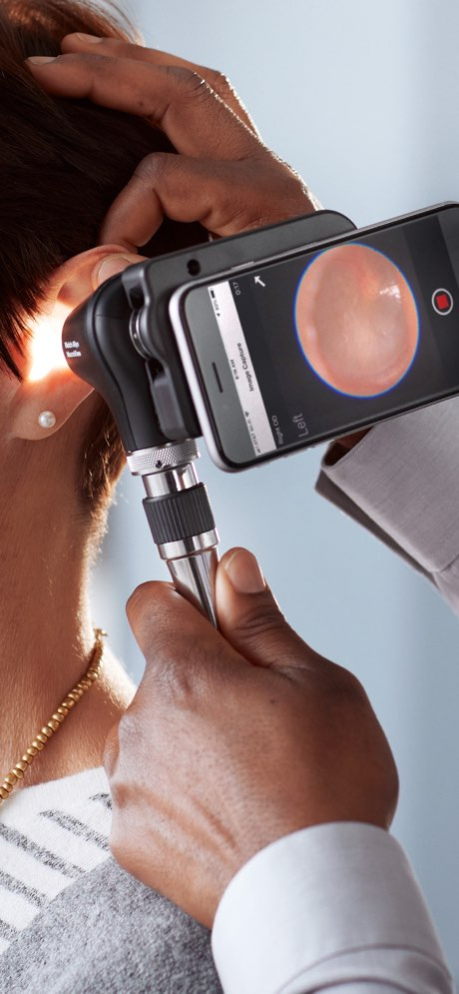
The new Welch Allyn iExaminer Pro app lets you capture amazing images from the new MacroView(TM) Plus otoscope and PanOptic(TM) Plus ophthalmoscope. The app allows you to attach select smart phones to your instrument to...
The new Welch Allyn iExaminer Pro app lets you capture amazing images from the new MacroView(TM) Plus otoscope and PanOptic(TM) Plus ophthalmoscope. The app allows you to attach select smart phones to your instrument to quickly save and share what you see. The iExaminer app make it easy to get the best images, by capturing images over 30 seconds, then allowing you to quickly select the best to store and share. Optional features, such as digital filter options, provide new ways to review your exam results. For more information, visit www.welchallyn.com/iExaminer. iExaminer is a registered trademark of Baxter Inc.
Version History The app now automatically uses the higher resolution telephoto lens when available. Follow the instructions in the Instructions for Use to align the SmartBracket to the correct lens. The app also automatically chooses the optimal resolution to capture images. The option to change resolution has been removed. We've updated the camera focusing in a few ways: • An optional Focus Guide can be enabled in the settings. When enabled, a green circle highlighting the center of focus will be displayed on the screen during image capture. • The screen can also be refocused (for focus and brightness) by tapping on the screen. The Focus Guide (when enabled) will then highlight the current center of focus. • While the focus guide shows on the screen during image capture, it will not be recorded on any captured images. The default zoom has been adjusted for telephoto lenses to optimize the image. 4.0.0 10/16/2023 We now support multiple languages, including Spanish, French, German, and many more. Use Settings to select the language for your phone. 3.1.13 06/24/2021 The newest version of iExaminer Pro app lets clinicians quickly capture and store the clinical images using select Welch Allyn devices. In addition to new devices and phones, the newest version of iExaminer Pro has these key features: • The iExaminer Pro app is not meant for the long-term storage of patient data. It has two modes: Clinical and Training. For use with patients, Clinical Mode should be selected, where no exam data is stored on the phone and exam data must be sent from the app after each exam. Training mode allows practice exams to be stored for up to 180 days and no individually identifiable patient or personal data should be stored. To switch between modes, delete the app and reinstall which removes all exam data. Save any data you want before deleting the app. • In Training Mode • To better maintain confidentiality, the iExaminer Pro app requires a password to start or view exams. Notice: resetting the password will delete all stored records, so remember your password. • For each saved exam, a Medical Record Number or Patient Name is required. • We now support multiple languages, including Spanish, French, German, and many more. Use Settings to select the language for your phone. • Exams now have an exam field populated with the date and time you start an exam. • Image capture now starts automatically when entering the Image Capture screen. As before, recording continues for 30 seconds or until you stop capture. • Audible cues tell you when image capture starts and stops. This can be disabled in Settings. • Image capture zoom can be stepped to preset levels using the + and – buttons or continuously zoomed with a pinch motion. • Tapping the screen will adjust the camera’s focus and exposure levels. • You can now swipe through all the images of an exam in the full screen mode. 3.1.12 04/19/2021 The updated iExaminer Pro app lets clinicians quickly capture and store the best retinal images they see during a Welch Allyn PanOptic eye exam. This newest version iExaminer Pro app allows the users to: •Updated the image selection screen thumbnail slider to better align with standard iOS appearances •Added additional higher resolution image capture choices (current resolution will become the standard resolution) Update also includes some bug fixes 2.2 03/13/2019 The updated iExaminer Pro app lets clinicians quickly capture and store the best retinal images they see during a Welch Allyn PanOptic eye exam. This newest version iExaminer Pro app allows the users to: •Apply a grayscale, high-contrast, or red-free filter to an image during viewing or sharing. •Move an already captured image from one eye to the other •Zoom up to 5x when capturing or viewing an image •Search for a previously saved exam on the saved exams screen •Identify the angle an image was captured at using a vertical orientation arrow which is added to captured images to indicate what direction was ‘up’ when the image was captured 2.1 08/31/2018 The updated iExaminer Pro app lets clinicians quickly capture and store the best retinal images they see during an exam. Our new iExaminer Pro app has a clean and modern user interface to make exams quicker and more intuitive. The app also allows the users to: o Capture more images (up to five images per eye) and improves the ability to capture and store the best shot o Capture up to 30 seconds of images o Allows easier selection of the best images o Send reports and images by email or store to iCloud drive for efficient network storage 2.0 04/16/2018 1.1 07/31/2017
Previous Versions
Here you can find the changelog of Welch Allyn iExaminer Pro since it was posted on our website on 2023-09-07 20:41:26.
The latest version is 4.0.0 and it was updated on 2026-10-07 00:19:16. See below the changes in each version.
Welch Allyn iExaminer Pro version 4.0.0
Updated At: 2026-10-07
Changes: Version History The app now automatically uses the higher resolution telephoto lens when available. Follow the instructions in the Instructions for Use to align the SmartBracket to the correct lens.
The app also automatically chooses the optimal resolution to capture images. The option to change resolution has been removed.
We've updated the camera focusing in a few ways:
• An optional Focus Guide can be enabled in the settings. When enabled, a green circle highlighting the center of focus will be displayed on the screen during image capture.
• The screen can also be refocused (for focus and brightness) by tapping on the screen. The Focus Guide (when enabled) will then highlight the current center of focus.
• While the focus guide shows on the screen during image capture, it will not be recorded on any captured images.
The default zoom has been adjusted for telephoto lenses to optimize the image. 4.0.0 10/16/2023 We now support multiple languages, including Spanish, French, German, and many more. Use Settings to select the language for your phone. 3.1.13 06/24/2021 The newest version of iExaminer Pro app lets clinicians quickly capture and store the clinical images using select Welch Allyn devices.
In addition to new devices and phones, the newest version of iExaminer Pro has these key features:
• The iExaminer Pro app is not meant for the long-term storage of patient data. It has two modes: Clinical and Training. For use with patients, Clinical Mode should be selected, where no exam data is stored on the phone and exam data must be sent from the app after each exam. Training mode allows practice exams to be stored for up to 180 days and no individually identifiable patient or personal data should be stored. To switch between modes, delete the app and reinstall which removes all exam data. Save any data you want before deleting the app.
• In Training Mode
• To better maintain confidentiality, the iExaminer Pro app requires a password to start or view exams. Notice: resetting the password will delete all stored records, so remember your password.
• For each saved exam, a Medical Record Number or Patient Name is required.
• We now support multiple languages, including Spanish, French, German, and many more. Use Settings to select the language for your phone.
• Exams now have an exam field populated with the date and time you start an exam.
• Image capture now starts automatically when entering the Image Capture screen. As before, recording continues for 30 seconds or until you stop capture.
• Audible cues tell you when image capture starts and stops. This can be disabled in Settings.
• Image capture zoom can be stepped to preset levels using the + and – buttons or continuously zoomed with a pinch motion.
• Tapping the screen will adjust the camera’s focus and exposure levels.
• You can now swipe through all the images of an exam in the full screen mode. 3.1.12 04/19/2021 The updated iExaminer Pro app lets clinicians quickly capture and store the best retinal images they see during a Welch Allyn PanOptic eye exam.
This newest version iExaminer Pro app allows the users to:
•Updated the image selection screen thumbnail slider to better align with standard iOS appearances
•Added additional higher resolution image capture choices (current resolution will become the standard resolution)
Update also includes some bug fixes 2.2 03/13/2019 The updated iExaminer Pro app lets clinicians quickly capture and store the best retinal images they see during a Welch Allyn PanOptic eye exam.
This newest version iExaminer Pro app allows the users to:
•Apply a grayscale, high-contrast, or red-free filter to an image during viewing or sharing.
•Move an already captured image from one eye to the other
•Zoom up to 5x when capturing or viewing an image
•Search for a previously saved exam on the saved exams screen
•Identify the angle an image was captured at using a vertical orientation arrow which is added to captured images to indicate what direction was ‘up’ when the image was captured 2.1 08/31/2018 The updated iExaminer Pro app lets clinicians quickly capture and store the best retinal images they see during an exam.
Our new iExaminer Pro app has a clean and modern user interface to make exams quicker and more intuitive.
The app also allows the users to:
o Capture more images (up to five images per eye) and improves the ability to capture and store the best shot
o Capture up to 30 seconds of images
o Allows easier selection of the best images
o Send reports and images by email or store to iCloud drive for efficient network storage 2.0 04/16/2018 1.1 07/31/2017
Welch Allyn iExaminer Pro version 4.0.0
Updated At: 2023-10-16
Changes: Oct 16, 2023
Version 4.0.0
The app now automatically uses the higher resolution telephoto lens when available. Follow the instructions in the Instructions for Use to align the SmartBracket to the correct lens.
The app also automatically chooses the optimal resolution to capture images. The option to change resolution has been removed.
We've updated the camera focusing in a few ways:
• An optional Focus Guide can be enabled in the settings. When enabled, a green circle highlighting the center of focus will be displayed on the screen during image capture.
• The screen can also be refocused (for focus and brightness) by tapping on the screen. The Focus Guide (when enabled) will then highlight the current center of focus.
• While the focus guide shows on the screen during image capture, it will not be recorded on any captured images.
The default zoom has been adjusted for telephoto lenses to optimize the image.
Welch Allyn iExaminer Pro version 4.0.0
Updated At: 2023-10-16
Changes: The app now automatically uses the higher resolution telephoto lens when available. Follow the instructions in the Instructions for Use to align the SmartBracket to the correct lens.
The app also automatically chooses the optimal resolution to capture images. The option to change resolution has been removed.
We've updated the camera focusing in a few ways:
• An optional Focus Guide can be enabled in the settings. When enabled, a green circle highlighting the center of focus will be displayed on the screen during image capture.
• The screen can also be refocused (for focus and brightness) by tapping on the screen. The Focus Guide (when enabled) will then highlight the current center of focus.
• While the focus guide shows on the screen during image capture, it will not be recorded on any captured images.
The default zoom has been adjusted for telephoto lenses to optimize the image.
Welch Allyn iExaminer Pro version 3.1.13
Updated At: 2021-06-24
Changes: Jun 24, 2021
Version 3.1.13
We now support multiple languages, including Spanish, French, German, and many more. Use Settings to select the language for your phone.
Disclaimer
Official App Store Link
We do not host Welch Allyn iExaminer Pro on our servers. We did not scan it for viruses, adware, spyware or other type of malware. This app is hosted by Apple and passed their terms and conditions to be listed there. We recommend caution when installing it.
The App Store link for Welch Allyn iExaminer Pro is provided to you by apps112.com without any warranties, representations or guarantees of any kind, so access it at your own risk.
If you have questions regarding this particular app contact the publisher directly. For questions about the functionalities of apps112.com contact us.